
Maja Space
Your Class 12 study plan, syllabus, revision and focus timer, on your phone, tablet and computer.
For Android phones and tablets, Windows and Mac. Free for Maja Space members.
Not ready to install? Try the preview in your browser first.
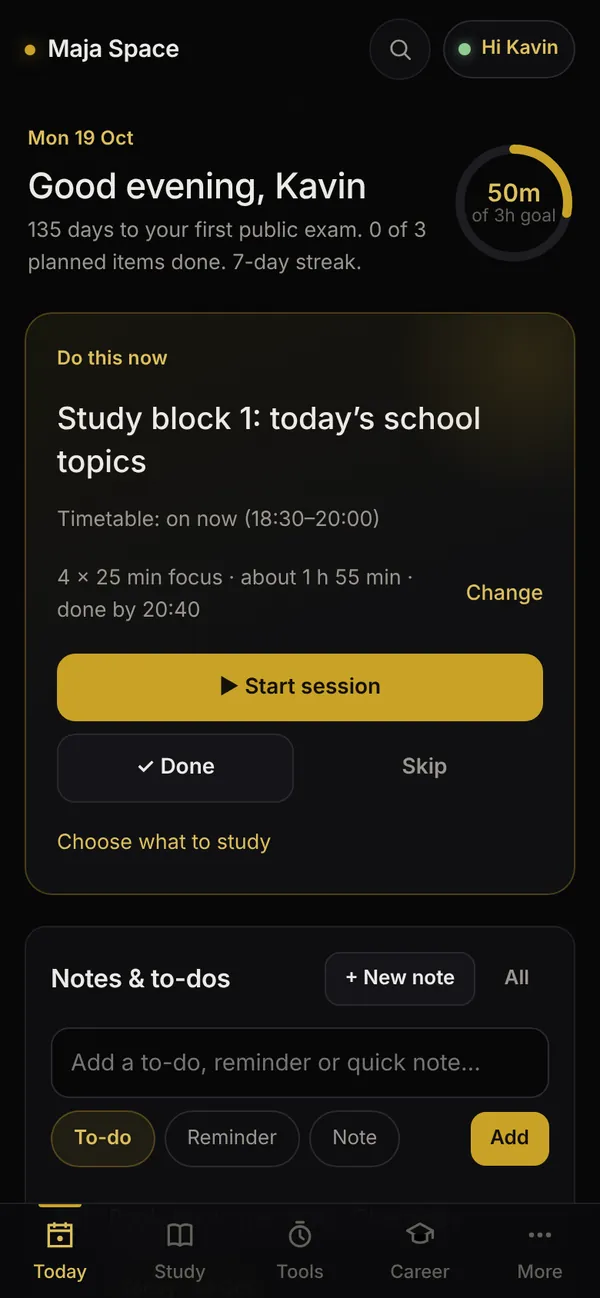
What it does for you
- A plan for every day
- What to study now, what comes next, and how much you did against your daily goal.
- The syllabus, topic by topic
- Tick what you have read. Revisions come back on time, so nothing fades before March.
- A focus timer that keeps you to it
- Rounds and breaks with an alert at each change. On Android it can lock Instagram, YouTube and games until the round ends.
- One calendar
- Classes, tests, tuition and study blocks together, with calendar files for Google or Outlook.
- Question papers and weightage
- Public, half-yearly, quarterly and PTA papers, and which chapters carry the marks.
- JEE, NEET and TNEA guidance
- Cutoffs, counselling steps and colleges, next to your own marks.
- Works offline, follows you
- Sign in with your member username on another device and your progress, notes and timer records come with you.
Download
Pick your device. The app is the same everywhere and signs in to the same account.
Android phone or tablet
Android 7 or newer.
Windows laptop or PC
Windows 10 or 11, 64-bit.
Mac with Apple silicon
M1, M2, M3 or M4 chip, most Macs from 2021 on. macOS 13 or newer.
Mac with an Intel processor
Older Macs, with macOS 13 or newer.
iPhone or iPad
Not available yet. Use an Android device or a computer.
Which Mac do you have? Apple menu, then About This Mac: “Chip Apple M…” is Apple silicon, “Processor Intel” is Intel.
The first install
The apps don’t come from an app store, so your device asks once whether you trust them. After that, Maja Space updates itself.
On Android
- Tap Download for Android. If Chrome says the file might be harmful, tap Download anyway.
- Open the downloaded file from the notification, or from Files, then Downloads.
- When Android asks, allow your browser to install apps, go back and tap Install.
- If Google Play Protect asks about the app, tap More details, then Install anyway.
- Open Maja Space and sign in with your member username and password.
Updates install by themselves. On Android 12 and newer, new versions of the app also install without asking once you allow it in Maja Space: Settings, then App updates.
On Windows
- Download MajaSpace-Setup.exe and open it.
- If you see “Windows protected your PC”, click More info, then Run anyway.
- Maja Space installs for your account, no administrator needed, and opens. It adds a shortcut to the Start menu and the desktop.
- Sign in with your member username and password.
Content updates install by themselves. When a new version of the Windows app is out, Settings, then App updates, shows a Download button.
On a Mac
- Download the file for your Mac and open it.
- Drag Maja Space into Applications.
- Open it from Applications. If the Mac says it can’t check the app, click Done, open System Settings, then Privacy & Security, scroll down and click Open Anyway, then confirm.
- Sign in with your member username and password.
Content updates install by themselves. When a new version of the Mac app is out, Settings, then App updates, shows a Download button.
Used Maja Space in the browser before?
Maja Space used to open at this address. It now lives in the apps. If you signed in with your member username, everything you saved is in your account: sign in to the app with the same username and password and it comes back.
Then, in the app: Settings, Backup and restore, Restore from file. The file stays on your device; nothing is sent anywhere.
Questions
Is it free?
Yes. Maja Space is for Maja Space members, with no ads and nothing to pay.
Why does my phone or computer warn me before installing?
Android, Windows and macOS warn about apps that don’t come from their stores or aren’t signed with a paid certificate. The files come straight from Maja Space’s own GitHub page, and every update is checked against Maja Space’s own signature before it installs, so a changed or fake file is refused.
How do updates work?
New content (pages, data, fixes) downloads by itself and is used the next time you open the app. New versions of the Android app install by themselves on Android 12 and newer once you allow it; on a computer, Settings, then App updates, shows a Download button.
Does it work without internet?
Yes. Everything you do is saved on your device first. Cloud sync catches up when you are back online. Question papers open from their source, so they need the internet.
Can I use it on two devices?
Yes. Sign in with the same member username and password on each one, and your progress, notes and timer records follow you.
What about iPhone and iPad?
There is no iPhone or iPad version yet. Use Maja Space on an Android device or a Windows or Mac computer.
What is the preview?
A copy of the app that runs in your browser with a sample student, so you can click through every page before installing. It has no sign-in and no sync, and nothing you do there is kept. To use Maja Space with your own account, install the app.
Where is the study assistant?
The AI study assistant is switched off in the apps for now: it needs a server to keep its key secret. Everything else works without it.